 B3 / B4 / 22 / 28

Student Travel Club - mTickets
Last updated: 10/11/2026
You have purchased a Student Travel Club mTicket - how does it work?
- Plan your journey ahead of time. You can find our network maps here and timetables here.
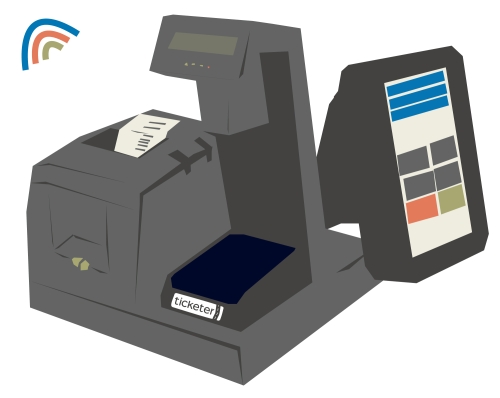
- When you board the bus - you will see the ticket machine directly in front of you.
- Place or "tap" the card on the ticket reader.
- Wait for the "beep" - this notifies the driver that your ticket is valid for travel.
- Away you "go" - either take a seat or please stand and hold onto the available grab handles/poles.
Frequently asked questions:
When can I travel with my mTicket?
Academic Year 2026-2027:
- Autumn term: 1st September 2026 to 31st December 2026
- Spring term: 1st January 2027 to 31st March 2027
- Summer term: 1st April 2027 to 31st July 2027
Where can I travel with my travel card?
Your mTicket will permit use on all First Essex Buses within a specified travel zone or route (unless otherwise stated).
Plan your journey
Require a map? You can find our network maps here.
Where do I scan my mTicket?
You will see the ticket machine directly in front of you when boarding the bus. It will look something like this ->
Do I "tap" getting off the bus?
There is no need to "tap off". Only one tap (and beep) is required when boarding the bus.
Do I need to "top-up" my STC mTicket?
No - the mTicket arrives with a start and end date. No top-up required.
Do I need to activate my STC mTicket?
No - the mTicket will automatically activate on the first day of your ticket's validity -
- Autumn term: 1st September 2026 to 31st December 2026
- Spring term: 1st January 2027 to 31st March 2027
- Summer term: 1st April 2027 to 31st July 2027
Do I need a photo-card?
No - a photo-card is not required.
Why has my mTicket been declined?
Below are some of the more common reasons why a travel card transaction may have failed:
- Incorrect usage - if the mTicket is scanned outside the ticket's validity the card reader will not authorise the transaction and the driver will be notified that the ticket has been declined.
- Multiple devices detected - if more than one card/device is detected by the reader at one time the transaction will be rejected and the driver will be notified that the ticket has been declined. This is not a problem - take a moment - and then present the travel card to the reader once again.
Unfortunately, our drivers will not always be able to explain why a mTicket transaction has failed. If a passenger attempts to travel without valid means of travel they will be asked to pay the prevailing on-bus fare.
Can somebody else use my travel card?
No - the mTicket is to be used by the ticket holder only.
As the mTicket is loaded with a student ticket you might be asked to prove your entitlement. Misuse of the ticket may result in one or all of the following: ticket cancellation, withdrawal of travel or/and not eligible for a refund.
Our Revenue Protection Officers board our services frequently and may ask to view a passenger’s ticket – if the ticket holder is unable to present their ticket - they could be issued with a £50.00 standard fare charge. For further information please visit our Revenue Protection Officer FAQs webpage: Our Revenue Protection Officers | First Bus
To view the full First Bus Conditions of Travel, please visit: Conditions of travel | First Bus
I left something on the bus - who do I contact?
If you leave an item on the bus, take care when returning to the bus (as the driver may be pulling away). If the bus has already left - please submit a lost property report to log the missing item.
The lost property form can be found here: Lost Property | First Bus
Getting in touch:
We want you to get help as quickly as possible. Our FAQs cover most common questions - if you can't find what you're looking for, our Customer Service Team is here to help.
Phone: 03456 460 707 (Available Mon-Fri, 9am-5pm)
Help & Support: Help and support | First Bus